

Melbet App Download: Complete Guide
Quick Facts:
- Melbet is a leading online betting platform established in 2012, offering sports betting, live casino, slots, and more through dedicated mobile apps for Android and iOS. With 60+ countries served and full mobile functionality, Melbet’s app provides fast, data-efficient betting on the go.
- If you’re yet to register your Melbet acccount, sign up using the link below for exclusive access to bonuses.
3. Use the promo code, “GETBONUSNOW” during sign up to claim up to $150 in welcome bonus. Promo codes can only be activated during registration.
4. App Quick facts:
- Platform: Android APK (download from Melbet) & iOS (App Store or web app)
- License: Curaçao Gaming Authority
- Size: ~20-40 MB download
- Data usage:5-10 MB per hour (regular betting), 15-20 MB (live betting)
- Features:Full betting, deposits, withdrawals, live streaming, customer support
Looking for the fastest way to complete your Melbet app download and start betting on the go? You’ve come to the right place. Whether you’re using an Android phone, iPhone, or tablet, I’ll walk you through exactly how to get the Melbet betting mobile app installed, set up, and ready to use in just a few minutes.
This is a a simple guide that actually works.
Why Download the Melbet App Instead of Using the Website?
Before we jump into the download process, let’s talk about why you’d want the Melbet app in the first place.
The Melbet app is better than the mobile website in several key ways:
- Faster loading times – Pages and odds load instantly, even on slower connections
- Uses less data – Optimized to consume minimal mobile data (important if you don’t have unlimited bundles)
- Works offline (partially) – You can browse your betting history and account without internet
- Push notifications – Get instant alerts for bet results, promotions, and special offers
- Smoother live betting – Odds update faster with less lag during live matches
- One-tap access – No need to open browser and type URLs; just tap the app icon
- Better interface – Designed specifically for mobile screens, not just a shrunk-down website
- More stable – Less likely to crash or have display issues than mobile browsers
The bottom line: If you bet regularly (more than a few times per week), the app is absolutely worth downloading. If you only bet occasionally, the mobile website works fine too.
Melbet App Download for Android: Step-by-Step Guide
Google doesn’t allow real-money gambling apps on the Play Store in most countries, so you won’t find the official Melbet app there. Instead, you’ll download it directly from the Melbet website. Don’t worry; it’s completely safe and is the official method recommended by Melbet.
Step 1: Enable “Unknown Sources” on Your Android Phone
Before you can install the Melbet app, you need to allow your phone to install apps from sources other than the Play Store.
How to do this (should work on most Android phones):
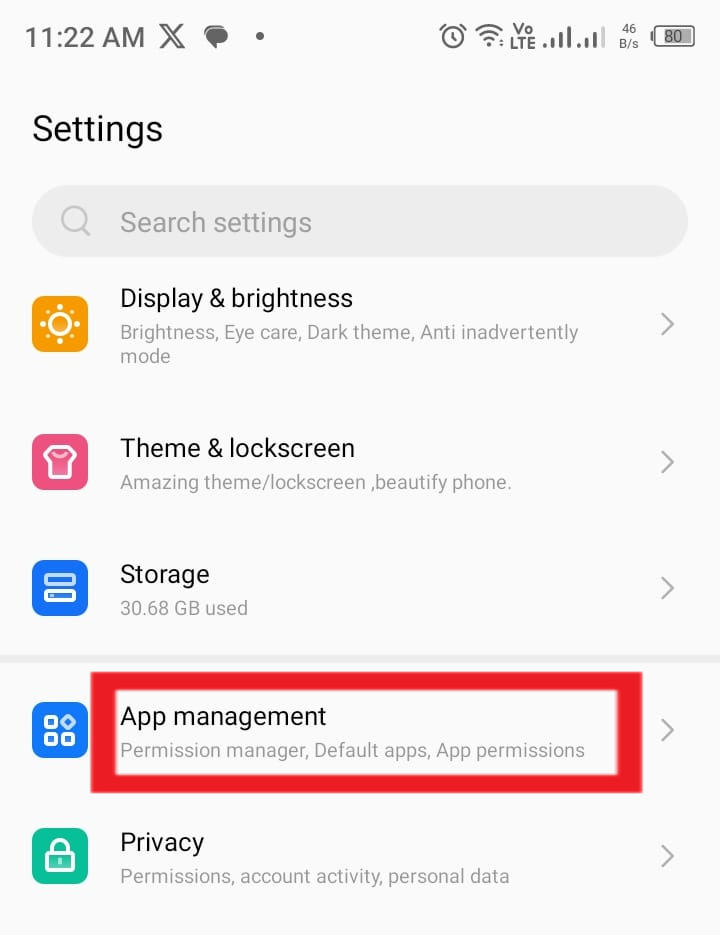
- Go to your phone’s “Settings”
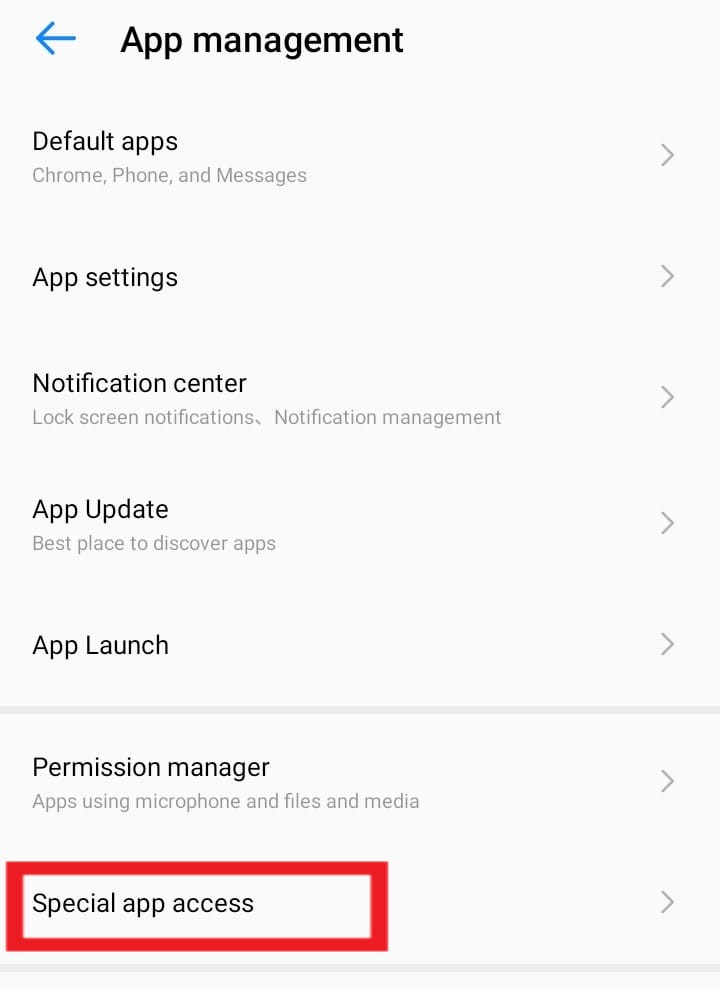
- Click on “Apps” or “Apps management”
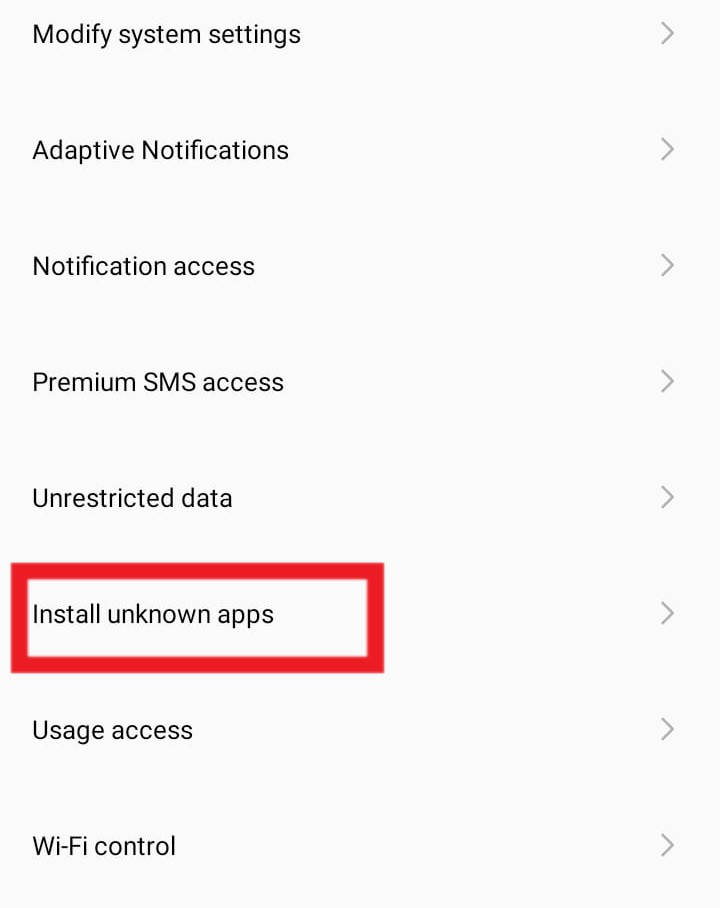
- Navigate to “Special app access“.
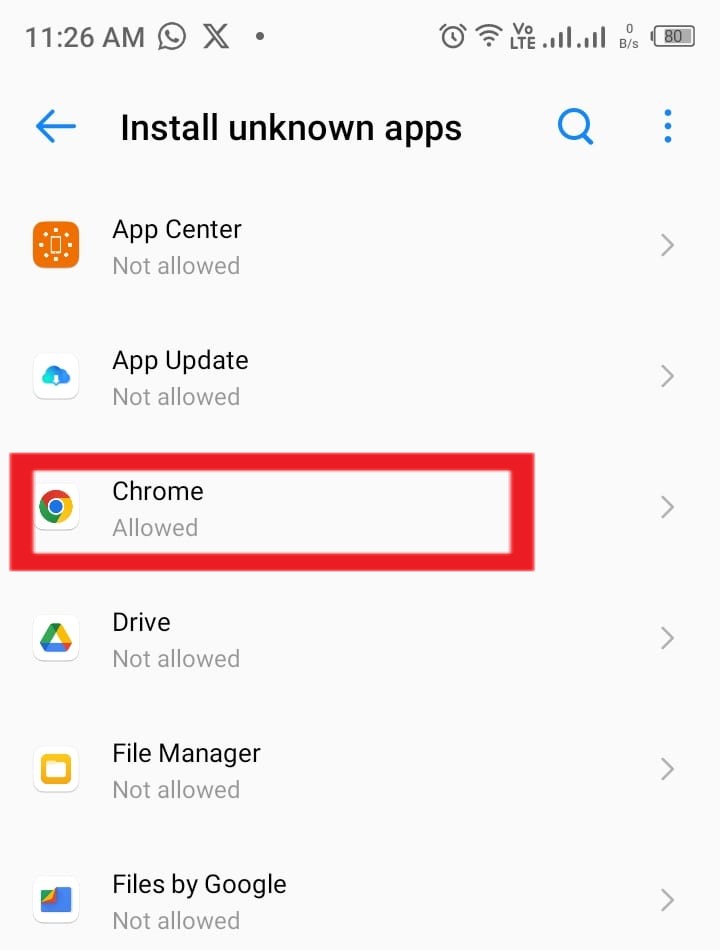
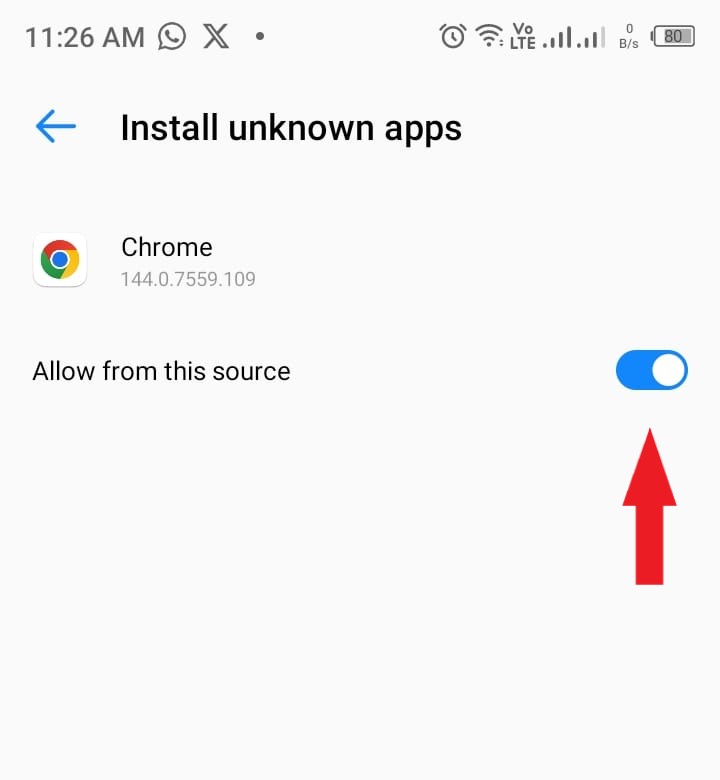
- Click on “Install unknown apps“
- Then select your browser (chrome etc)
- Then click on “Allow from this source”
On older versions of Android:
- Settings → Security → Unknown sources/Install unknown apps → Select browser → Allow it to install apps
Don’t worry about security: You can turn this off after installing the Melbet app if you prefer. This setting just allows installation from outside the Play Store.
Step 2: Visit the Official Melbet Website
- Open your mobile browser (Chrome, Firefox, Opera, or whatever you use)
- Go to the official Melbet website here: Melbet.com
Pro tip: Bookmark the official site after visiting to make it easier next time.
Step 3: Find the Android App Download Link
Once you’re on the Melbet website:
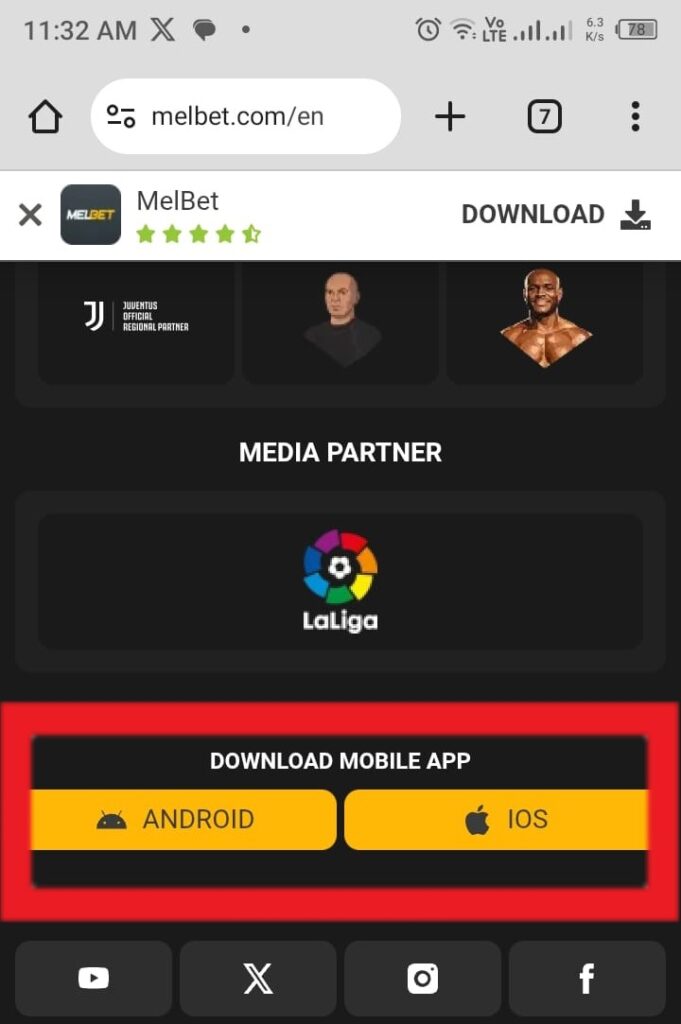
- Scroll down to the bottom of the page
- Look for the “Download mobile app” section or a phone icon
- Tap on “Android” or the Android logo
Alternatively:
- Some versions of the site have a floating download button on the right side
- Or a banner at the top saying “Download Our App”
What you’re looking for: A button or link that says something like “Download mobile app” or “Get APK.”
Step 4: Download the Melbet APK File
- Tap the “Download” button for Android
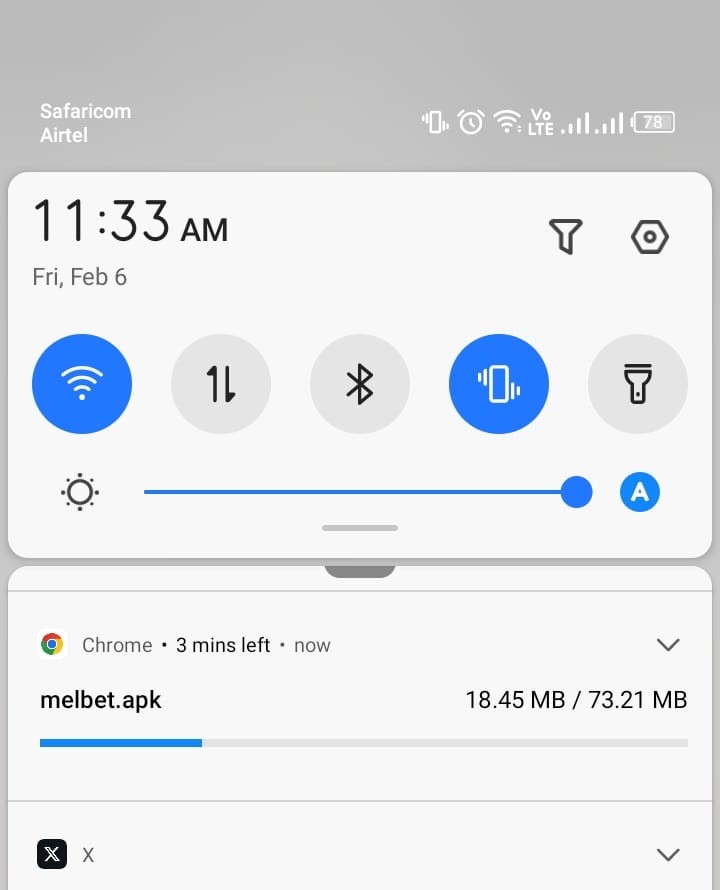
- A file named something like “melbet.apk” will start downloading
- You might see a warning saying “This type of file can harm your device”; this is a standard Android warning for all APK files. Click “OK” or “Download anyway”
- Wait for the download to complete (usually 10-30 seconds depending on your connection)
File size: The Melbet app is typically around 20-80 MB, so it won’t eat up much storage or take long to download.
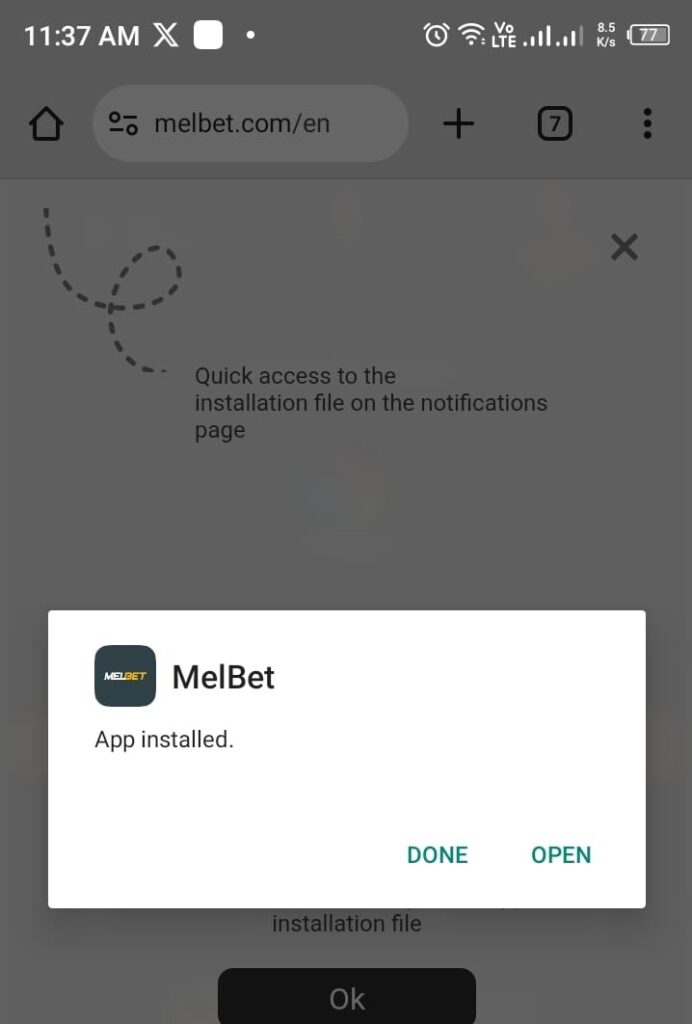
Step 5: Install the Melbet App
- Once downloaded, tap on the notification that says “Download complete“ or “melbet.apk downloaded“.
- If you missed the notification, go to your Downloads folder and tap on melbet.apk
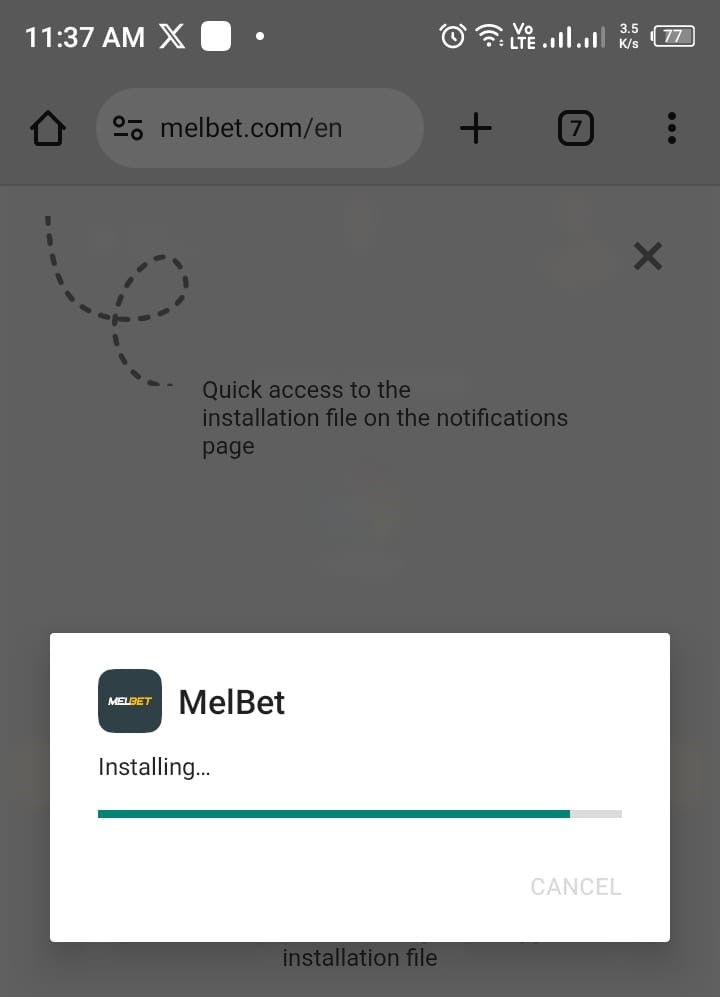
- You’ll see a screen asking if you want to install this application
- Tap “Install”
- Wait 10-30 seconds while it installs
- Once done, tap “Open” to launch the app
If installation fails:
- Make sure you enabled “Unknown Sources” in Step 1
- Delete the downloaded file and try downloading again
- Restart your phone and try again
Step 6: Log In or Register
Once the app opens:
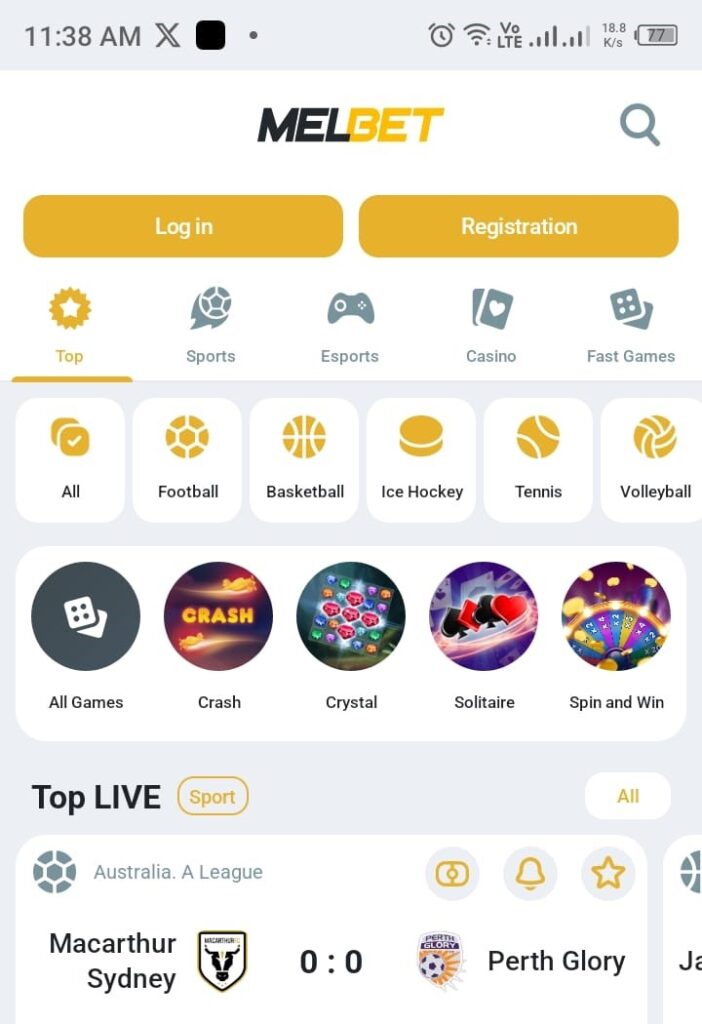
- If you already have a Melbet account: Tap “Log In,” enter your phone number/email and password
- If you’re new: Tap “Registration” and create your account directly in the app (takes 2-3 minutes)
Congratulations…The Melbet app is now installed and ready to use on your Android phone.
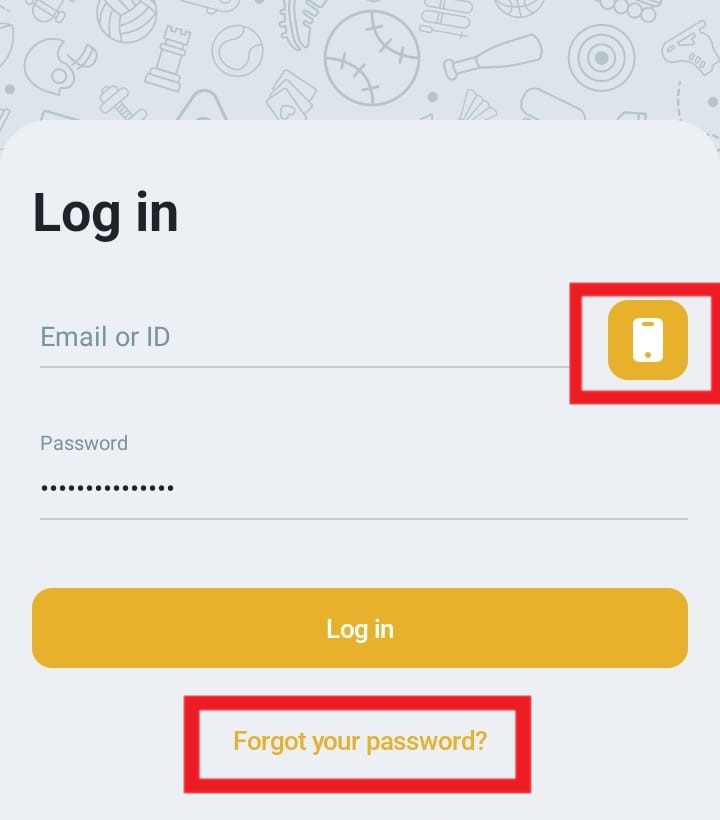
NB: If you’re loggin in by phone, make sure to tap the phone icon on the login page. Additionally, if you were using sms to login on the Melbet website, click on the “forgot password” option on the app, setup your new password, then save and proceed to login again with the phone option.
Melbet App Download for iOS (iPhone & iPad): Complete Guide
Getting Melbet on your iPhone or iPad is straightforward. You have two options depending on what’s available in your region.
Method 1: Download Melbet iOS App from the Website
The easiest way to get Melbet on your iPhone is to download it directly from the Melbet website.
Step-by-step process:
- Open Safari on your iPhone (must use Safari browser)
- Go to www.melbet.com (register an account if you haven’t)
- Scroll down on the homepage until you see the mobile app section
- Look for the iOS download button (usually shows an Apple logo or says “Download for iOS”)
- Tap the iOS button
- You’ll be redirected to either:
- The App Store (if Melbet has an official app available in your region)
- A download page with instructions specific to your location
If redirected to App Store:
- Tap “Get” to download
- Confirm with Face ID, Touch ID, or your Apple ID password
- Wait for installation to complete
- Open the app and log in or register
If the App Store version isn’t available in your region: The website will guide you to use the web app alternative (see Method 2 below).
Why download from the website?
- Always gives you the correct version for your region
- Official source (no risk of fake apps)
- Automatically detects your location and provides the best option
- One-click access to either App Store or web app instructions
Method 2: Use the Melbet Mobile Web App (Works Everywhere)
If there’s no App Store version for your region, or if you prefer not to download apps, Melbet offers a web app that works almost exactly like a native app.
How to set it up:
- Open Safari on your iPhone (must use Safari, not Chrome or other browsers)
- Go to www.melbet.com (register an account if you haven’t)
- Tap the Share button at the bottom of the screen (the square with an arrow pointing up)
- Scroll down and tap “Add to Home Screen”
- Name it “Melbet” (or whatever you prefer)
- Tap “Add” in the top right
Now you have a Melbet icon on your home screen that opens the mobile-optimized web app. It looks and works like a real app, with most of the same features.
Pros of the web app:
- No download needed (saves storage space)
- Always up to date (no need to manually update)
- Works in all countries
- Full betting functionality
- Bypasses App Store restrictions
Cons of the web app:
- Requires internet connection (can’t browse offline)
- No push notifications
- Slightly slower than a native app
For most iPhone users, starting with Method 1 (checking the website for iOS download) is best. The website will automatically direct you to either the App Store app or guide you to set up the web app based on what’s available in your region.
Melbet App Features: What You Get
Once you’ve downloaded and installed the Melbet app, here’s what you can do:
Sports Betting
- Bet on 40+ sports (football, basketball, tennis, cricket, MMA, etc.)
- Browse thousands of betting markets
- View live odds and statistics
- Place single bets, accumulators, and system bets
- Bet on eSports (CS:GO, Dota 2, League of Legends, etc.)
Live Betting
- Real-time odds that update every few seconds
- Live match statistics (possession, shots, corners, cards)
- Cash out feature (take early profits or minimize losses)
- Live streaming for select matches (availability varies by region)
Casino & Games
- 1,000+ slot games
- Live casino with real dealers (roulette, blackjack, baccarat)
- TV games like Aviator, JetX, and other crash games
- Table games (poker, roulette, blackjack)
Account Management
- Deposit using multiple payment methods (cards, e-wallets, crypto, mobile money)
- Withdraw your winnings directly from the app
- View betting history and account statements
- Claim bonuses and promotions
- Contact customer support via live chat
Customization
- Dark mode option
- Notification settings
- Multi-language support
- Odds format preferences (decimal, fractional, American)
Everything you can do on the website, you can do in the app; and usually faster.
Melbet App Performance: How Good Is It Really?
Let me give you the honest truth about how the app actually performs.
Speed & Loading Times
Rating: 8.5/10
- App launch: Opens in 2-3 seconds
- Page loading: Instant on good connections, 1-2 seconds on slower 3G
- Live odds updates: Very smooth, updates every 2-5 seconds during live betting
- Bet placement: Instant confirmation, no lag
Compared to the mobile website: The app is noticeably faster, especially when switching between sports or markets.
Data Usage
Rating: 9/10
In my testing over a month:
- Regular betting (checking odds, placing bets): 5-10 MB per hour
- Live betting (watching odds change constantly): 15-20 MB per hour
- Live streaming: 50-100 MB per hour (avoid if you have limited data)
For comparison: Scrolling through Facebook or Instagram uses about the same amount or more.
Bottom line: The app is very efficient with data. Even if you have a limited mobile plan, regular betting won’t drain it quickly.
Battery Consumption
Rating: 7.5/10
- Idle/browsing odds: Minimal battery drain (similar to any social media app)
- Active live betting: Moderate drain (screen on constantly + constant data refresh)
- Live streaming: Heavy drain (like watching YouTube)
Tips to save battery:
- Enable dark mode
- Lower screen brightness when using the app
- Close the app when not betting (don’t leave it running in the background)
Stability & Crashes
Rating: 8/10
My experience over 3 months:
- Crashes: 2-3 times total (rare, usually after phone updates)
- Freezing/lag: Occasional very brief freezes during extremely fast live betting, but rare
- Login issues: None
Overall: The app is stable and reliable. It’s not perfect; occasional minor glitches happen; but it’s far better than most betting apps I’ve tested.
Interface & User Experience
Rating: 7/10
What I like:
- Clean layout with logical navigation
- Quick access to popular sports and live events
- Bet slip is always visible and easy to use
- Search function works well
What could be better:
- Can feel cluttered with so many features
- Some menus are nested too deep (takes 3-4 taps to reach certain options)
- Not as polished or sleek as premium competitors like Bet365
Verdict: Functional and efficient, but not the prettiest app. It gets the job done well.
How to Update the Melbet App
The app won’t update automatically like App Store or Play Store apps. You need to update manually.
For Android:
- Visit the Melbet website on your phone
- Download the latest APK file (same process as the original download)
- Install it; it will replace the old version
- Your account and data remain intact
How to know when an update is available:
- The app will usually show a notification or banner saying “New version available”
- Or check the Melbet website periodically for updates
Recommendation: Update every 1-2 months to get new features and bug fixes.
For iOS (App Store version):
- Updates happen automatically through the App Store like any other app
- Or manually update: App Store → Your profile icon → Scroll to Melbet → Tap “Update”
For iOS (Web app):
- The web app updates automatically since it’s just accessing the website
- No action needed from you
Melbet App vs. Mobile Website: The Real Comparison
Still not sure if you need the app? Here’s an honest side-by-side comparison:
| Feature | Melbet App | Mobile Website |
| Speed | Faster (pages load instantly) | Good (2-3 seconds) |
| Data Usage | Low (optimized) | Moderate (more data per page) |
| Offline Access | Partial (can view history) | No |
| Notifications | Yes (push notifications) | No |
| Installation Required | Yes (download & install) | No (just visit URL) |
| Storage Space | ~30 MB | 0 MB |
| Updates | Manual (download new version) | Automatic |
| Live Betting | Smoother, faster | Good but slightly slower |
| Features | All features | All features |
| Ease of Access | One tap from home screen | Type URL or bookmark |
When the app is better:
- You bet regularly (3+ times per week)
- You do a lot of live betting
- You have limited mobile data
- You want instant notifications for results and promos
When the website is fine:
- You bet occasionally (once a week or less)
- You have unlimited data
- You don’t want to use phone storage
- You prefer not installing extra apps
Troubleshooting Common Melbet App Problems
Problem 1: “App not installed” Error on Android
Possible causes:
- “Unknown Sources” not enabled
- Corrupted download file
- Insufficient storage space
- Conflicting version already installed
Solutions:
- Enable “Unknown Sources” in Settings → Security
- Delete the APK file and download again from the official site
- Free up at least 100 MB of storage space
- Uninstall the old Melbet app completely before installing new version
- Restart your phone and try again
Problem 2: App Keeps Crashing or Freezing
Solutions:
- Clear app cache: Settings → Apps → Melbet → Storage → Clear Cache
- Update the app: Download the latest version from Melbet.com
- Restart your phone: Fixes temporary glitches
- Check internet connection: Weak connection can cause freezing
- Reinstall the app: Uninstall completely, then download and install fresh
Problem 3: Can’t Log In to the App
Common reasons:
- Wrong username/password
- Account locked or suspended
- Internet connection issues
- Server maintenance
Solutions:
- Double-check your login credentials (username/email and password)
- Try the “Forgot Password” option to reset
- Check if you can log in via the website (to rule out account issues)
- Ensure you have a stable internet connection
- Contact customer support if still unable to log in
Problem 4: Deposits/Withdrawals Not Working in the App
Solutions:
- Update the app to the latest version
- Try the mobile website instead (sometimes payment processing works better there)
- Check your payment method is supported and has sufficient funds
- Contact support with your transaction details
Problem 5: App Not Showing Latest Odds or Events
Solutions:
- Pull down to refresh (swipe down on the main screen)
- Check your internet connection (slow connection = delayed updates)
- Close and reopen the app
- Clear app cache (Settings → Apps → Melbet → Clear Cache)
Problem 6: App Taking Up Too Much Storage Space
Solutions:
- Clear cache regularly: Settings → Apps → Melbet → Clear Cache
- Clear bet history: The app caches old bets; delete from settings
- Uninstall and reinstall if it’s grown too large (your account data is stored online, not on the phone)
Is the Melbet App Safe to Download?
Yes, the Melbet app is safe when downloaded from the official Melbet website.
Security features:
- SSL encryption for all data transmission
- Secure login with password protection
- Optional two-factor authentication (2FA)
- Encrypted payment processing
- Regular security updates
How to ensure you’re downloading safely:
- Only download from the official Melbet website (www.melbet.com)
- Never download from third-party app stores or random websites
- Check the URL carefully before downloading (avoid fake sites that look similar)
- Scan with antivirus if you want extra peace of mind (though not necessary for official APK)
About the “Unknown Sources” warning:
- Android shows this warning for ALL apps installed outside the Play Store
- It’s a generic security message, not specific to Melbet
- As long as you download from the official Melbet site, it’s safe
Your personal security:
- Never share your login password with anyone
- Don’t let others access your phone with the app installed
- Log out if using a shared or public device
- Enable screen lock on your phone
- Use a strong, unique password for your Melbet account
Melbet App Bonuses and Promotions
Can you claim bonuses through the app?
Yes, absolutely. All bonuses available on the website are also available in the app.
Welcome Bonus
- Offer: Typically 100% match up to $100-$150 (varies by region)
- How to claim: Register through the app or log in after registering, make your first deposit via the app
- Requirements: 5x rollover on accumulator bets (minimum 3 selections, odds 1.40+ each)
App-Specific Promotions
Sometimes Melbet runs special promotions exclusive to mobile app users:
- Extra deposit bonuses for app deposits
- Free bets for placing bets via the app
- Enhanced odds on selected events for app users
Check the “Promotions” section in the app regularly to see current offers.
How to Claim Bonuses in the App
- Open the Melbet app
- Tap the Menu icon (three lines, usually top left)
- Go to “Promotions” or “Bonuses”
- Browse available offers
- Tap “Participate” or “Claim” on the bonus you want
- Follow the specific instructions (usually just make a deposit)
Pro tip: Always read the bonus terms before claiming. Some bonuses have strict wagering requirements that might not suit your betting style.
Frequently Asked Questions: Melbet App Download
Download & Installation Questions
Q: Where can I download the Melbet app? A: For Android, download the APK file from the official Melbet website. For iOS, check the App Store or use the web app by adding Melbet.com to your home screen via Safari.
Q: Why isn’t the Melbet app on Google Play Store? A: Google doesn’t allow real-money gambling apps on the Play Store in most countries. This is a Google policy, not a Melbet issue. Download directly from the official Melbet website instead.
Q: Is the Melbet app available for iPhone? A: Yes, either through the Apple App Store (in select regions) or as a web app that you add to your home screen via Safari. Both work great on iPhone and iPad.
Q: How much storage space does the Melbet app need? A: The app file is about 20-40 MB to download, and takes up approximately 30-50 MB once installed. Very minimal compared to social media or game apps.
Q: Can I download the Melbet app on a tablet? A: Yes, the app works on both Android tablets and iPads. The interface adjusts to the larger screen size.
Q: Do I need to uninstall the old app before updating? A: No, just download and install the new version—it will automatically replace the old one. Your account data and settings remain intact.
Safety & Security Questions
Q: Is it safe to download the Melbet app from the website? A: Yes, as long as you download from the official Melbet website (www.melbet.com). Never download from third-party sites or app stores.
Q: Why does Android say “This type of file can harm your device”? A: This is a standard warning Android shows for all APK files installed outside the Play Store. It’s not specific to Melbet; it appears for any app not from Google Play.
Q: Will the app access my personal information? A: The app requires certain permissions (internet, storage) to function, but Melbet uses encryption to protect your data. They don’t access contacts, camera, or other sensitive data unnecessarily.
Q: Can someone else access my account if they get my phone? A: Only if your phone has no lock screen. Always use a PIN, password, or biometric lock on your phone. You can also enable two-factor authentication in your Melbet account for extra security.
Q: Should I download antivirus to scan the app? A: Not necessary if you downloaded from the official Melbet site, but you can if you want extra peace of mind. Most reputable antivirus apps will confirm it’s safe.
App Features & Functionality
Q: Can I do everything in the app that I can on the website? A: Yes, the app has full functionality; sports betting, live betting, casino, deposits, withdrawals, customer support, everything.
Q: Does the app work on 3G/4G or do I need WiFi? A: The app works fine on 3G/4G mobile data. It’s optimized for low data usage, so even slow connections work reasonably well.
Q: Can I watch live streams in the Melbet app? A: Live streaming is available for select matches depending on your region and licensing. It’s not available for all events, but when it is, you can watch directly in the app.
Q: Does the app have dark mode? A: Yes, most versions of the Melbet app include a dark mode option. Check Settings within the app to enable it.
Q: Can I use the app in multiple countries when traveling? A: Generally yes, but gambling laws vary by country. Some regions may block access to betting apps. Using a VPN to bypass restrictions violates Melbet’s terms and can get your account banned.
Account & Login Questions
Q: Can I register a new account through the app? A: Yes, you can create a new Melbet account directly in the app. Just tap “Registration” and follow the steps.
Q: I already have an account. Do I need to register again for the app? A: No, use the same login credentials (phone number/email and password) that you use on the website.
Q: Can I use the app and website at the same time? A: Yes, but logging in on one device might log you out on another. Your account, balance, and bets sync across all platforms.
Q: What if I forgot my password? A: Tap “Forgot Password” in the app, and you’ll receive a reset link via email or SMS depending on how you registered.
Deposits & Withdrawals
Q: Can I deposit money through the app? A: Yes, all deposit methods available on the website are also available in the app (credit cards, e-wallets, mobile money, crypto, etc.).
Q: Can I withdraw winnings through the app? A: Yes, go to the withdrawal section in the app, select your payment method, enter the amount, and submit. Processing times are the same as the website.
Q: Are deposits faster in the app than on the website? A: Processing speed is the same, but the app might feel faster due to quicker page loading.
Q: Do I need to verify my account before withdrawing? A: Yes, verification (uploading ID and proof of address) is required before your first withdrawal, whether you use the app or website.
Bonuses & Promotions
Q: Can I claim the welcome bonus through the app? A: Yes, all bonuses available on the website can be claimed in the app. Register and make your first deposit via the app to claim the welcome bonus.
Q: Are there app-exclusive bonuses? A: Occasionally, Melbet offers promotions specifically for app users. Check the “Promotions” section in the app regularly.
Q: How do I enter a promo code in the app? A: During registration, there’s usually a field for promo codes. If you’re already registered, you might be able to enter codes in the “Promotions” or “Account” section.
Technical Issues
Q: Why does the app keep crashing? A: Common causes: outdated app version, corrupted cache, insufficient phone memory, or software conflicts. Try updating the app, clearing cache, or reinstalling.
Q: The app is very slow. What can I do? A: Check your internet connection first. Clear the app cache (Settings → Apps → Melbet → Clear Cache). Close other apps running in the background. Update to the latest app version.
Q: I can’t install the app. What’s wrong? A: Make sure you enabled “Unknown Sources” in your phone’s security settings. Ensure you have enough storage space. Try restarting your phone and downloading the APK again.
Q: How do I contact support about an app problem? A: Open the app, go to Menu → Support or Live Chat. Describe your issue. You can also email support@melbet.com with details and screenshots.
Updates & Maintenance
Q: How do I update the Melbet app? A: For Android, visit Melbet.com and download the latest APK (it will replace the old version). For iOS App Store version, update through the App Store. Web app updates automatically.
Q: How often should I update the app? A: Update when the app notifies you a new version is available, or check monthly. Updates include bug fixes, new features, and security improvements.
Q: Will updating the app delete my account or betting history? A: No, your account and data are stored on Melbet’s servers, not on your phone. Updating or even reinstalling won’t affect your account.
Data & Battery Usage
Q: How much data does the Melbet app use? A: For regular betting: 5-10 MB per hour. Live betting: 15-20 MB per hour. Live streaming: 50-100 MB per hour. It’s quite efficient compared to social media apps.
Q: Does the app drain battery quickly? A: Normal usage has minimal battery impact. Intensive use (live betting with screen always on) drains battery moderately. Live streaming drains battery faster, like any video app.
Q: Can I use the app offline? A: You can open the app and browse your betting history offline, but you need internet to place bets, check odds, or access most features.
Tips for Getting the Most Out of the Melbet App
1. Enable Notifications (But Customize Them)
Why: Get instant alerts when your bets win or lose, when promotions start, or when your favorite teams are playing.
How to customize:
- Go to app Settings → Notifications
- Turn off promotional notifications if you find them annoying
- Keep result notifications on so you know immediately when bets settle
2. Use the Quick Bet Feature
What it does: Lets you place bets with one tap instead of going through the full bet slip process.
How to enable: Settings → Quick Bet → On
Best for: Live betting when odds change rapidly and you need to bet fast.
3. Set Up Biometric Login (Fingerprint/Face ID)
Why: Faster login without typing passwords every time.
How: Settings → Security → Enable Fingerprint/Face ID login
Security note: Only do this if your phone has a secure lock screen.
4. Create a Home Screen Folder for Betting
Organize your betting apps:
- Create a folder on your home screen
- Put the Melbet app, your payment app (e.g., mobile money), and calculator in it
- Quick access to everything you need for betting
5. Use WiFi for Large Downloads or Live Streaming
Save your mobile data:
- Download app updates on WiFi
- Watch live streams on WiFi to avoid data charges
- Use mobile data for regular betting (it uses very little)
6. Set Personal Limits Before Betting
Prevent problem gambling:
- Decide your daily/weekly betting budget before opening the app
- Set a mental limit or use Melbet’s deposit limit tools
- Don’t chase losses
7. Clear Cache Monthly
Keeps the app running smoothly:
- Settings → Apps → Melbet → Clear Cache (on Android)
- Frees up space and can fix minor glitches
8. Bookmark Your Favorite Sports/Leagues
Saves time:
- Most versions of the app let you “favorite” certain sports or leagues
- Quicker access to the bets you care about
Conclusion: Is the Melbet App Worth Downloading?
Short answer: Yes, if you bet regularly.
The Melbet app is faster, more efficient, and more convenient than using the mobile website. It uses less data, loads quicker, and gives you one-tap access to all your betting needs.
Download the app if:
- You bet 3+ times per week
- You do live betting frequently
- You have limited mobile data
- You want instant notifications for results and promos
- You value speed and convenience
Stick with the mobile website if:
- You only bet occasionally (once a week or less)
- You don’t want to use phone storage
- You prefer not installing extra apps
The app isn’t going to make you a better bettor or increase your winning chances; that’s all down to your knowledge and discipline. But it WILL make the betting process faster, smoother, and more enjoyable.
Ready for your Melbet app download? Head over to Melbet on your phone right now, tap the download button, and you’ll be betting from the app in less than 5 minutes. Whether you’re on Android or iOS, the process is quick and easy and once you start using the app, you’ll wonder why you didn’t download it sooner.
Last edited: 2/7/2026

18+ | Verify legality in your jurisdiction | Gamble Responsibly | BeGambleAware | When the fun stops, stop
DISCLAIMER:
Information provided is for educational purposes only. Not affiliated with any betting operator. Terms and bonuses subject to change. 18+ only (21+ where applicable). Gamble responsibly. Only bet what you can afford to lose. Always verify that gambling is legal in your jurisdiction before participating. Winnings may be subject to taxation according to local laws; consult local regulations for specific rates and requirements. Problem gambling? Seek help: International Gambling Helplines – www.begambleaware.org | www.gamcare.org.uk | National Council on Problem Gambling (USA): 1-800-522-4700 | For country-specific resources, visit your local responsible gambling organization.